
Modal Pricing: Per-Second GPU Billing Explained
Modal bills GPUs, CPU and memory by the second while a container runs. Here is how that bill is composed and how to line it up against an hourly rental.
- Pricing
- Modal
- Serverless
- GPUs

Modal Pricing: Per-Second GPU Billing Explained
Modal pricing is metered differently from most GPU clouds. Instead of renting an instance by the hour, you pay for each second a container runs: one rate for the GPU, one for CPU cores and one for memory, plus a plan fee on paid plans. This guide explains what Modal meters, what it adds on top, and how to turn a Modal rate into a per-GPU-hour figure you can compare with an hourly rental. We print no rates here because they change; the live Modal page shows the current figures and the date each was read. Everything below about Modal's terms comes from modal.com/pricing and modal.com/docs as read on 10 November 2026.
What Modal meters
Modal runs your Python functions in containers it starts on demand. Its pricing page lists three resources metered per second:
- GPU, per GPU attached to the container.
- CPU, per physical core, which Modal counts as 2 vCPUs. Every container reserves at least 0.125 cores.
- Memory, per GiB.
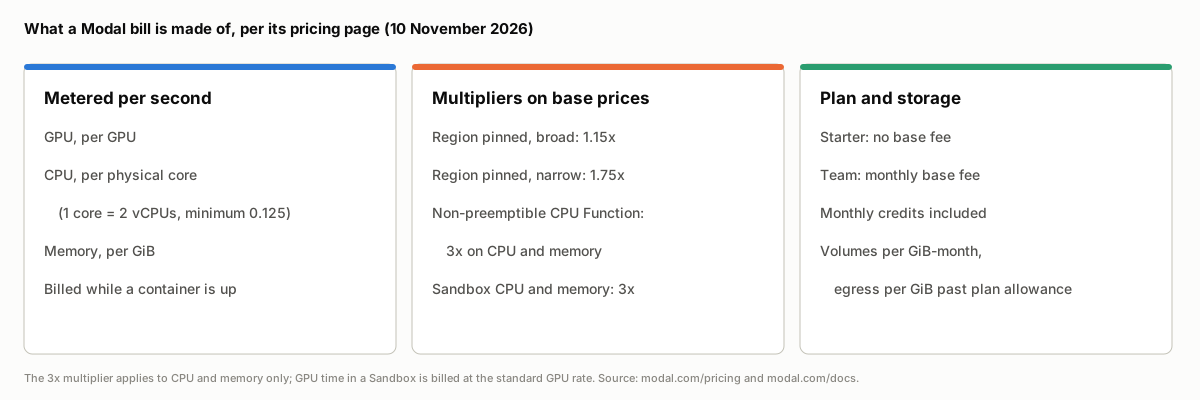 Three columns showing what Modal's pricing page lists: resources metered per second (GPU, CPU per physical core, memory per GiB), multipliers on base prices (region pinning at 1.15x or 1.75x, 3x on CPU and memory for non-preemptible CPU Functions and Sandboxes), and plan and storage charges (Starter with no base fee, Team with a monthly base fee, included credits, volumes and egress)
So a GPU function's bill has more than one line. The GPU rate is usually the largest part, but the CPU and memory the container reserves are charged for the same seconds. When you compare Modal with a provider whose hourly rate bundles vCPUs and RAM into the instance, remember that Modal's GPU rate does not include them.
Which GPUs Modal offers
Modal's pricing page lists the B300, B200, H200 SXM, H100 SXM5, RTX PRO 6000, A100 80 GB, A100 40 GB, L40S, A10, L4 and T4. You choose one in code (for example
gpu="H100"Two request options affect what you are billed for:
- Automatic upgrades. Modal may run a
request on an H200, or agpu="H100"
request on an 80 GB A100, without changing the cost. Usegpu="A100"
,H100!
orA100-40GB
to pin the exact card.A100-80GB
lets Modal run the function on a B200 or a B300, and it is billed as a B200 either way.B200+
You can also pass a fallback list of GPU types, which Modal tries in order. Each type is billed at its own rate, so a fallback can change what a run costs.
Billable time: when the meter runs
Per-second billing is only cheaper than an hourly rental if the meter stops when you are not using the GPU, so it matters what Modal counts. Its pricing page says billing covers the time it takes to start a container and load your application, and the time spent processing inputs. After the last input, a container stays up for a scaledown window (60 seconds by default, configurable) so the next input does not pay for a cold start, and that idle time is billed. Once an app has scaled to zero, nothing is charged.
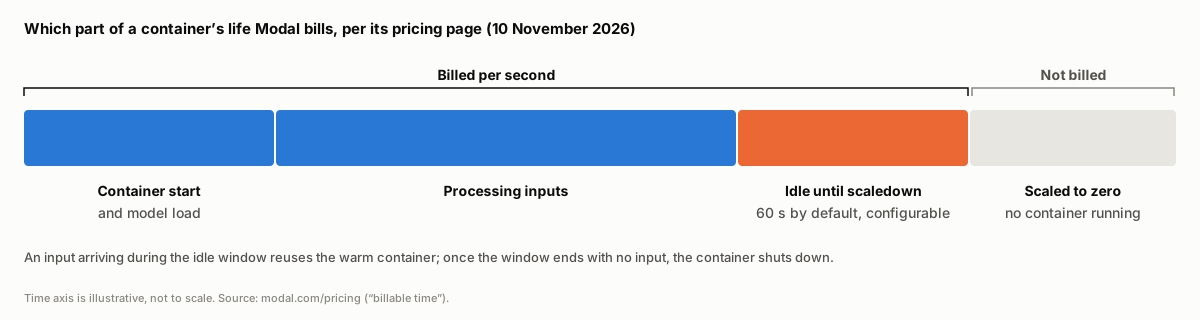 A timeline of a Modal container's life: container start and model load, processing inputs, and an idle scaledown window of 60 seconds by default are billed per second; after the container scales to zero nothing is billed
Two consequences for estimating a bill:
- Cold starts are paid for. A large model that takes a long time to load is billed for that load time on every new container.
- The scaledown window is a trade-off. A longer window keeps containers warm for bursty traffic and is billed while idle; a shorter one saves idle time and pays for more cold starts.
Multipliers on the base price
Modal's pricing page lists two multipliers:
- Region selection. Pinning a Function or Sandbox to a region multiplies base prices: 1.15x for a broad region such as
, 1.75x for a narrow one such asus
(Modal's region-selection docs give both figures). With no region set, no multiplier applies.us-west - Non-preemptible execution. Modal Functions are preemptible by default; Modal restarts a preempted function on the same input, so the docs recommend making work safe to retry and checkpointing long jobs. CPU Functions can opt out with
, which applies a 3x multiplier to CPU and memory. GPU Functions cannot opt out.nonpreemptible=True
Sandboxes (containers you start and control directly, used for running untrusted or agent-generated code) are billed at the non-preemptible 3x rate for CPU and memory, with GPU at the standard GPU rate. They are charged on the greater of the resources requested and the resources used.
Plans, credits and what else is billed
| Starter | Team | Enterprise | |
|---|---|---|---|
| Base fee | None | Monthly | Custom |
| Included monthly credits | Yes | Larger | By agreement, with volume discounts |
| Seats | 3 | Unlimited | Unlimited |
| GPU concurrency | 10 | 50 | Higher, by agreement |
| Monthly egress included | 1 TiB | 10 TiB | 100 TiB |
Beyond compute, Volumes (persistent storage) are billed per GiB per month with 1 TiB a month free, and network egress past the plan allowance is billed per GiB. Modal's shared inference endpoints are billed per token rather than per second and are not covered by the included credits. Modal also offers startup and academic credit grants, and Enterprise customers can apply committed spend through the AWS and GCP marketplaces.
The GPU concurrency limit is worth checking before choosing a plan: on Starter, no more than 10 GPUs run at once across your workspace.
How to compare Modal with an hourly GPU rental
Modal publishes its GPU rates per second. To compare them with providers that price by the hour, multiply by 3,600. That is what computeprices.com stores: the per-second figure Modal prints is kept as the original price, and the stored rate is the per-GPU-hour equivalent, labelled with the conversion (our methodology lists every conversion the site applies). Each Modal row is one GPU, on demand, with no region.
That per-GPU-hour figure is a like-for-like rate, not a like-for-like bill. Before comparing two providers, account for three differences:
- CPU and memory. Add what your container reserves; an hourly instance elsewhere often bundles them.
- Utilization. Modal charges for the seconds a container is up. An hourly rental charges for every hour you hold it, busy or not. If your GPU is busy a small share of the day, multiply Modal's per-GPU-hour rate by the hours a container is actually up (including load and scaledown time) and compare that with the other provider's rate times the hours you would keep the instance running.
- Region and preemption. Pinning a region raises Modal's base prices. Spot or interruptible rentals elsewhere are a different product from an on-demand row.
For steady, round-the-clock work such as a long training run, the per-GPU-hour rate is the number to compare, and dedicated GPU clouds are the natural point of comparison. For bursty inference, batch jobs and pipelines that sit idle between runs, the bill depends mostly on how many seconds the containers are up, which no rate table shows. Our earlier guide to hourly vs subscription GPU pricing covers how billing granularity affects a bill more generally.
Where to see Modal's rates beside other providers
- The H100, H200, B200 and A100 SXM pages list every provider renting each card, with Modal's row among them.
- Side-by-side pages line up two providers on the cards they share: Modal vs Runpod, Lambda vs Modal and AWS vs Modal.
- Modal alternatives ranks providers that sell the same GPUs.
- The full GPU table filters by card and pricing type.
Frequently asked questions
How does Modal pricing work? Modal bills per second while a container runs: a rate per GPU, per physical CPU core and per GiB of memory, plus a monthly base fee on the Team plan. Pinning a region and some non-preemptible workloads apply multipliers. The Modal page shows the current GPU rates converted to per GPU-hour.
Does Modal charge when my app is idle? Not once it has scaled to zero. A container that has just finished its last input stays up for its scaledown window (60 seconds by default), and that time is billed, as is container start and model load time.
Which GPUs does Modal have? Its pricing page lists the B300, B200, H200, H100, RTX PRO 6000, A100 (80 GB and 40 GB), L40S, A10, L4 and T4, with up to 8 GPUs per container (4 for the A10).
Is Modal's GPU rate the whole cost of a GPU function? No. CPU and memory are metered separately for the same seconds, and storage beyond the free Volumes allowance and egress beyond the plan allowance are billed on top.
Does Modal offer spot or reserved GPU pricing? Its pricing page lists one GPU rate per card, and GPU Functions run preemptibly by default. Enterprise customers can negotiate volume discounts. computeprices.com stores Modal's published rate as on-demand.