Hourly vs Subscription GPU Pricing
Hourly pricing offers flexibility for short or irregular workloads; subscriptions deliver 40–65% lower per-hour costs for steady, 24/7 GPU use.
- AI
- GPUs
- Performance

Hourly vs Subscription GPU Pricing
When renting GPUs for AI workloads, you have two main payment options: hourly pricing and subscription pricing. Each has its advantages and trade-offs. Here’s the key takeaway:
- Hourly Pricing: Pay for what you use. Ideal for short-term or unpredictable workloads. Rates can range from $1.49 to $10.00 per hour depending on the GPU cloud providers and GPU model.
- Subscription Pricing: Commit to a fixed term (monthly or yearly) for lower rates. Discounts can reach 40–65% off hourly rates, making it better for steady, long-term usage.
Key Difference:
- Hourly: Flexible, no long-term commitment, but higher cost per hour.
- Subscription: Cheaper per hour, but requires consistent usage and upfront commitment.
Quick Comparison
| Metric | Hourly Pricing | Subscription Pricing |
|---|---|---|
| Cost per GPU-Hour | Higher | Lower (40–65% discounts) |
| Flexibility | High | Low (fixed term/hardware) |
| Availability | May vary | Guaranteed |
| Billing | Per usage (granular) | Fixed monthly/annual |
| Best For | Short-term, R&D | Long-term, steady usage |
Hourly pricing is great for experiments or irregular tasks, while subscriptions work best for 24/7 operations or predictable workloads. The choice depends on your usage patterns and budget priorities.
::: @figure 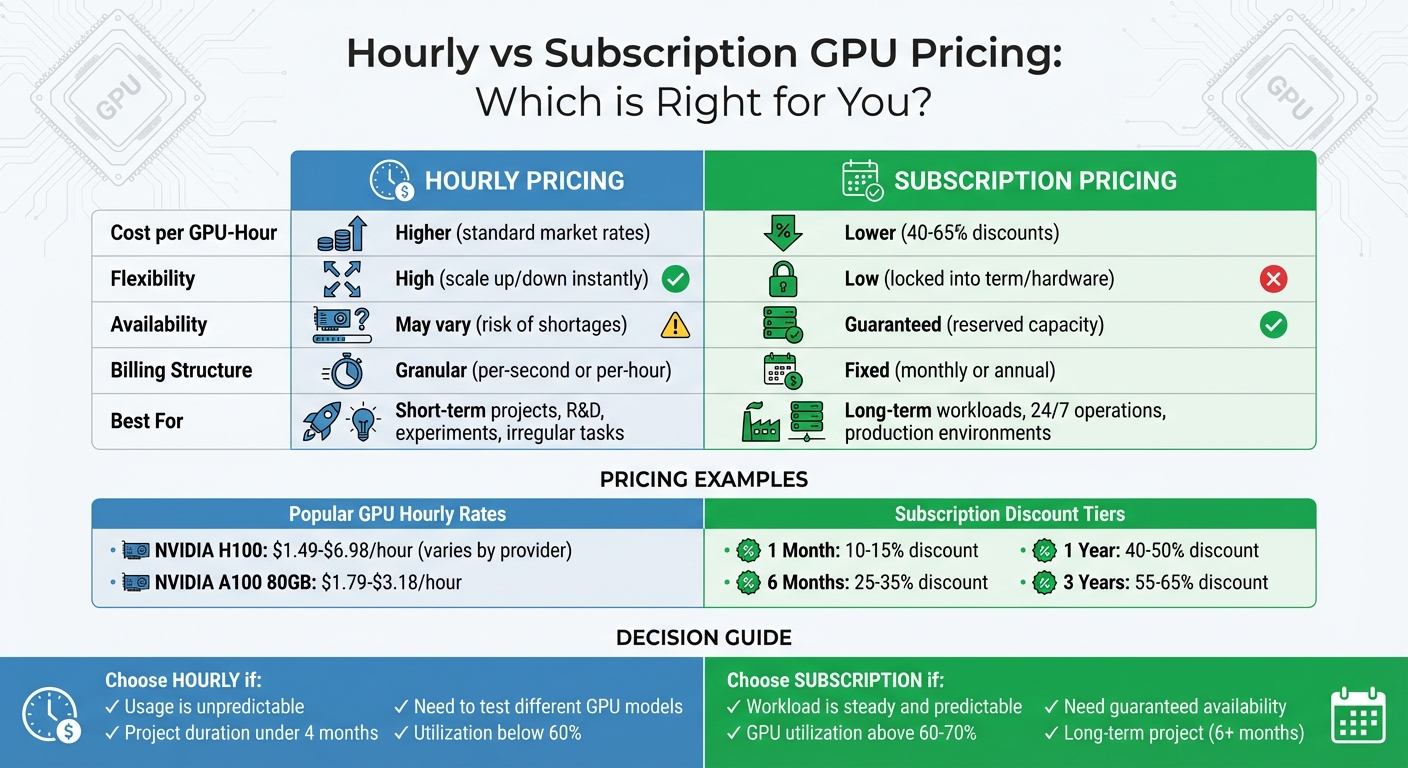 Hourly vs Subscription GPU Pricing Comparison Chart{Hourly vs Subscription GPU Pricing Comparison Chart}
:::
Hourly vs Subscription GPU Pricing Comparison Chart{Hourly vs Subscription GPU Pricing Comparison Chart}
:::
Hourly GPU Pricing
How Hourly Pricing Works
With hourly pricing, you're charged only for the time you actually use the GPUs. The cost is calculated using this formula: (Number of GPUs) × (Hourly Rate) × (Usage Hours).
Some providers, like AWS and Synexa, offer per-second billing with a 60-second minimum. This means if your task takes 15 minutes, you’re billed for just those 15 minutes [2].
"Per-second billing removes the cost of unused compute time from your bill. This particularly helps workloads that run over irregular time periods." – Amazon Web Services [2]
However, billing policies can vary. For instance, on Paperspace, charges continue if the compute capacity is reserved - even if the machine is powered off. To completely stop charges, you’ll need to destroy the instance instead of just shutting it down [7].
GPU prices also differ across providers and models. For example, the NVIDIA H100 costs anywhere from $1.49/hour on Vast.ai to $6.98/hour on Azure. Similarly, the NVIDIA A100 80GB ranges from $1.79/hour on Lambda Labs to $3.18/hour on Paperspace [6] [7]. If you’re running multiple GPUs, the costs add up quickly. For example, using eight H100 GPUs on Paperspace at $5.95/hour each would total $47.60/hour [7].
This pricing structure highlights the flexibility of hourly billing, which comes with its own set of advantages.
Benefits of Hourly Pricing
The biggest draw of hourly pricing is its flexibility. There’s no long-term commitment, making it ideal for short-term tasks like experiments or handling sudden workload spikes [5].
You’re only billed for the time you actually use. For example, if a job takes three hours, you’re charged for just those three hours. Some providers even offer "scale to zero" options, meaning you aren’t charged when no tasks are running [4].
Another perk is the availability of spot instances, which utilize spare capacity at significantly lower rates - sometimes 60%–91% cheaper than on-demand pricing [3]. The downside? Spot instances can be reclaimed by the provider at any time, so they’re best suited for non-critical tasks that can handle interruptions.
Here’s a quick comparison of pricing for some popular GPUs:
| GPU Model | Provider | On-Demand Rate | Spot/Discount Rate |
|---|---|---|---|
| H100 80GB | Vast.ai | $1.87/hr | Varies by availability |
| H100 80GB | Lambda Labs | $2.99/hr | N/A |
| A100 80GB | Thunder Compute | $0.78/hr | N/A |
| A100 80GB | Synexa | $2.49/hr | N/A |
Hourly pricing also lets you test different GPU models without committing to a long-term contract. For instance, you can compare how an A100 performs versus an H100 for your workload before making a larger investment.
Still, while hourly pricing has clear advantages, it’s not without its challenges.
Drawbacks of Hourly Pricing
The flexibility of hourly pricing often comes at a premium. Hourly rates are typically the most expensive option, sometimes costing 2–3× more than subscription-based plans for the same GPU [5]. For example, using an H100 at $3.00/hour would add up to about $2,160 per month, compared to $1,498 per month with a 12-month subscription [5].
Another downside is availability. During peak demand, high-demand GPUs like the H100 may be unavailable in certain regions, leaving you to either wait or switch to a different data center. Spot instances, while cheaper, can also be interrupted mid-task when the provider reclaims capacity.
Budgeting can be tricky with hourly pricing. Unlike subscriptions with fixed monthly costs, hourly billing fluctuates based on actual usage. If your team scales up unexpectedly or forgets to terminate idle instances, you might face an unexpectedly high bill at the end of the month.
Regional pricing differences add another layer of complexity. The same GPU model can cost 10–30% more on the U.S. West Coast compared to the East Coast. When choosing a region, you’ll also need to factor in data transfer costs and latency.
Subscription GPU Pricing
How Subscription Pricing Works
Subscription pricing involves signing a fixed-term contract - ranging from one month to three years - that guarantees discounted GPU access. This approach shifts costs from capital expenditure (CapEx) to operational expenditure (OpEx), offering predictable pricing for businesses. However, the catch is you must reserve specific GPU configurations for the entire contract duration, making it a commitment-heavy option[8].
The longer the commitment, the greater the discount. For example, a one-month subscription might cut costs by 10–15%, while a three-year contract can slash rates by 55–65% compared to on-demand pricing[8]. To illustrate, committing to an NVIDIA H100 for 12 months could reduce the on-demand rate of $10.50/hour to about $5.50/hour. A three-year commitment would drop it even further to approximately $4.20/hour[8].
Here's a breakdown of Google Cloud's committed use discounts for various GPUs in the us-central1 region:
| GPU Model | On-Demand Rate | 1-Year Commitment | 3-Year Commitment |
|---|---|---|---|
| NVIDIA T4 | $0.35/hr | $0.22/hr | $0.16/hr |
| NVIDIA V100 | $2.48/hr | $1.56/hr | $1.12/hr |
| NVIDIA P100 | $1.46/hr | $0.92/hr | $0.66/hr |
It’s worth noting that if your actual usage falls below 60–70% of the committed capacity, hourly billing might end up being more cost-effective[8]. Still, for consistent workloads, subscription pricing offers predictable savings and operational stability.
Benefits of Subscription Pricing
Subscription pricing can cut expenses by 40–60% compared to on-demand rates, making it a strong option for businesses with steady workloads[8]. Fixed fees also simplify budget planning, giving companies a clearer picture of their financial commitments[1].
Another advantage is guaranteed GPU access, even during periods of high demand. Companies with subscription agreements reported up to 70% fewer availability issues compared to hourly users during hardware shortages[8]. This means your reserved GPUs remain accessible, even when demand spikes globally or during peak usage periods[8][9]. Additionally, dedicated resources eliminate performance fluctuations caused by shared environments, ensuring low latency and consistent results - particularly important for tasks like real-time inference.
The length of your commitment also impacts your savings and use cases:
| Commitment Term | Typical Discount Range | Best Use Case |
|---|---|---|
| 1 Month | 10–15% | Short-term projects with steady usage |
| 6 Months | 25–35% | Model fine-tuning and mid-term R&D |
| 1 Year | 40–50% | Stable production workloads |
| 3 Years | 55–65% | Long-term enterprise infrastructure |
Drawbacks of Subscription Pricing
While subscription pricing offers financial perks, it’s not without risks. The most significant downside is paying for unused capacity. Since you’re billed a fixed rate regardless of actual usage, underutilized GPUs can inflate your effective hourly cost. For instance, having 40% idle capacity can drive up overall expenses[8].
Another limitation is the lack of flexibility. Subscriptions tie you to a specific GPU model, which means you might miss out on newer hardware advancements during the contract term[8].
"The rapid pace of hardware evolution makes flexibility increasingly valuable, potentially favoring hourly models for early adopters and subscription models for stable production environments." – Cyfuture AI [8]
Upfront commitments can also strain budgets, especially if your workload needs change unexpectedly. If you exceed your subscription's capacity, you’ll likely pay premium on-demand rates for the extra resources, driving up costs for overflow usage[8].
Hourly vs Subscription: Direct Comparison
Comparison Metrics
When weighing hourly versus subscription GPU pricing, the choice often boils down to a trade-off between control and cost savings. Hourly pricing is all about flexibility - you can scale down to zero instantly, switch hardware as needed, and pay only for the compute time you actually use. On the other hand, subscription pricing requires a fixed commitment but offers hefty discounts, cutting per-hour costs by 40–65%, depending on the term length[8].
The catch? If your GPU usage falls below 60–70%, you end up paying for idle resources. But for operations running GPUs almost non-stop, subscription models can lead to massive savings. A notable example of this came during the 2023 GPU shortage: subscription users retained full access to resources, while hourly users faced availability drops of up to 70%[8].
| Metric | Hourly Pricing | Subscription Pricing |
|---|---|---|
| Cost per GPU-Hour | High (standard market rates) | Low (40–65% discounts)[8] |
| Flexibility | High (scale up/down instantly) | Low (locked into term/hardware) |
| Availability | Best-effort (risk of shortages) | Guaranteed (reserved capacity) |
| Billing | Granular (per-second or hour) | Fixed (monthly or annual) |
| Ideal Use | R&D, ad-hoc testing, bursts | Production, 24/7 training |
Let’s break this down further with real-world cost examples.
Cost Scenario Example
Consider a vehicle company needing 20 NVIDIA H100 GPUs running continuously for a year to train perception models. Under hourly pricing at $10.50/hour, the annual cost would be $1,874,880. By committing to a 12-month subscription at $5.50/hour (a 48% discount), the company cut its annual expense to $982,080, saving a whopping $892,800[8].
Now, take a research lab running intermittent drug discovery simulations. They used 8 NVIDIA A100 GPUs for 40 hours per week over 45 weeks, totaling 1,800 hours annually. With hourly pricing at $3.20/hour, their yearly cost came to $46,080. A 24/7 subscription, however, would have cost $150,451 annually. In this case, the hourly model saved the lab $104,371, a 69% reduction, thanks to their lower utilization rate[8].
These examples highlight how your usage patterns - whether constant or sporadic - are key to choosing the right pricing model.
sbb-itb-dd6066c
When to Use Each Pricing Model
When to Choose Hourly Pricing
Hourly pricing works best for irregular or short-term workloads where GPU usage is hard to predict. It’s a great option for development teams experimenting with new models, researchers running occasional tests, or startups working on proof-of-concept projects. The flexibility makes it easy to scale up or down as needed.
For example, if you’re tackling a project that spans a few weeks or months - say, under four months - hourly pricing can save you from long-term commitments. You might rent an H100 GPU for a weekend hackathon or log 160 hours of simulations over a month, then shut everything down when the work is done. This pay-as-you-go model is a smart choice for teams working with tight budgets or exploring GPU acceleration without diving into long-term contracts.
It’s also ideal for agile setups where requirements change frequently. One week, you might need eight A100 GPUs; the next, only two. However, if your workload is more stable and consistently uses a lot of GPU power, a subscription might offer better savings.
When to Choose Subscription Pricing
For workloads that are steady and predictable, subscription pricing can deliver substantial cost benefits. If your GPUs run continuously and maintain utilization above 50%, a subscription plan is likely the better route. This is particularly true for use cases like production AI inference servers, always-on model training pipelines, or extended research projects.
Subscriptions come with two key advantages: lower costs per unit and billing consistency. Knowing your monthly expenses upfront makes financial planning simpler.
"Subscription plans provide cost predictability and can lead to substantial savings for businesses with stable GPU demands."
– Novita AI [1]
Another perk of subscriptions is guaranteed resource availability. This is critical for businesses that rely on uninterrupted compute power - think SaaS platforms offering real-time AI-driven features.
Using ComputePrices.com to Compare Options
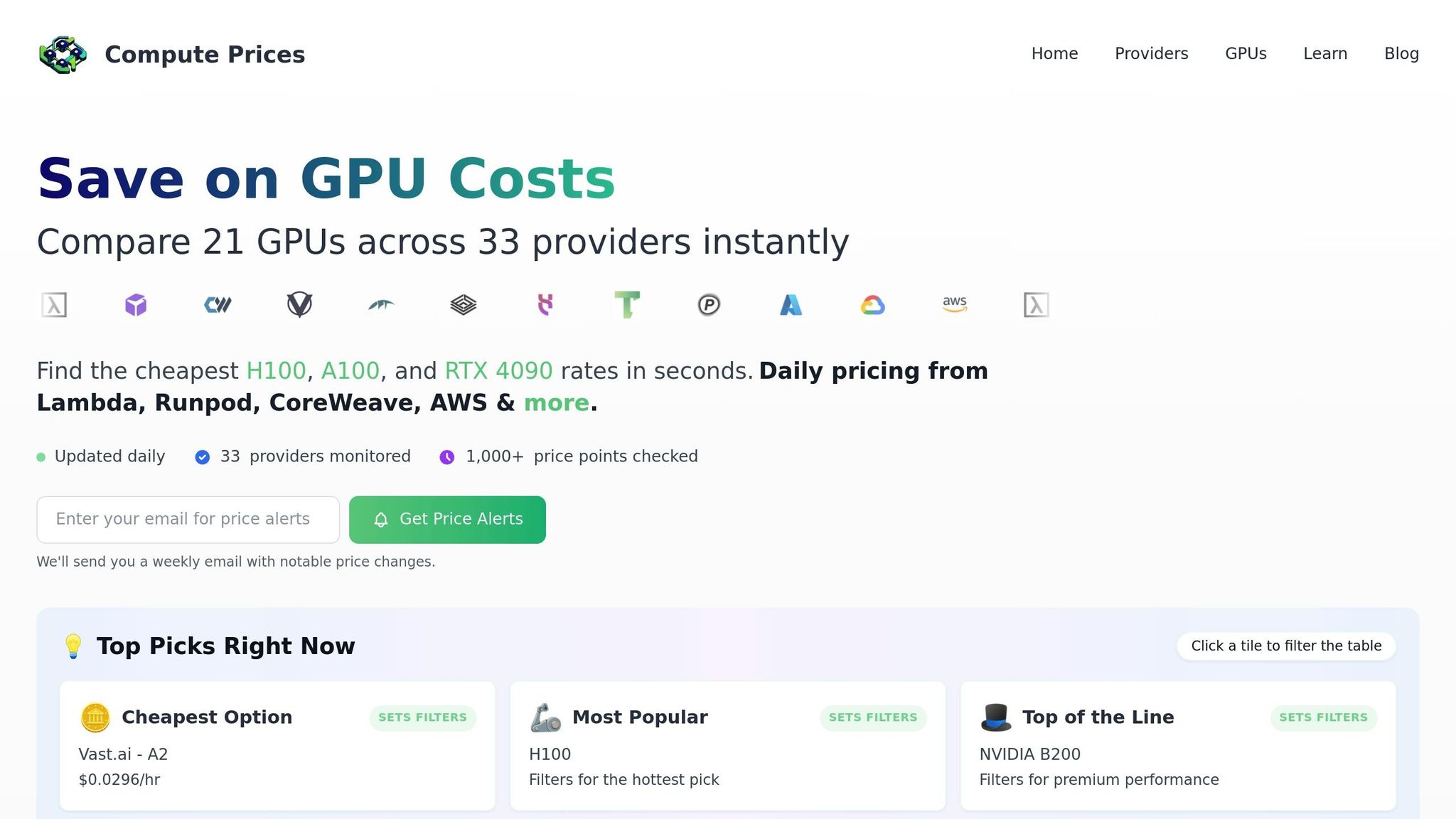 ComputePrices.com
ComputePrices.com is a handy tool for comparing GPU pricing across providers. Tracking over 1,000 price points from 31 providers daily, the platform offers real-time insights into both hourly and subscription rates. For example, H100 prices have dropped significantly - from around $8.00 per hour at launch to more competitive rates near $1.99 per hour as specialized cloud providers challenge larger hyperscalers [5].
The platform allows you to filter results based on your specific needs, whether it’s AI training, inference, or development. You can easily compare GPUs like the H100, A100, and RTX 4090 side by side. This makes it simple to decide if a subscription is worth the commitment or if hourly pricing offers the flexibility you need. With daily updates, you’ll avoid locking into outdated rates.
3 Free Cloud GPU Resources & Price Comparison of Paid Alternatives
::: @iframe https://www.youtube.com/embed/q66_5BNIKwM :::
Conclusion
Selecting the right pricing model for your GPU needs hinges on your workload. Hourly pricing is perfect for flexibility - it lets you experiment, scale up or down quickly, and avoid paying for unused resources. This option works best for short-term projects, development phases, or when demand is unpredictable. On the other hand, subscription plans are better suited for steady, consistent workloads. They typically offer lower per-unit costs and make it easier to plan your budget.
"Choosing the right GPU pricing model is crucial for optimizing costs and performance... On-demand pricing offers flexibility for variable workloads, while subscription models provide cost predictability and savings for consistent usage." – Novita AI [1]
The GPU rental market has become increasingly competitive. For instance, H100 GPU prices have dropped significantly, from about $8.00 per hour to a range of $2.00 to $4.00 per hour as of 2025 [5]. Providers often adjust their pricing by as much as 20% to 25% in a single update [5]. Keeping an eye on these changes is key, and tools like ComputePrices.com can help. This platform tracks over 1,000 price points across 31 providers daily, making it easier to find the best deals, whether you're comparing hourly rates or subscription options.
A practical approach is to start with hourly pricing during your development phase. Once your workload becomes more predictable, transitioning to a subscription plan can save costs. Many teams also adopt a hybrid strategy - using a subscription for their baseline needs while relying on hourly pricing to handle temporary surges. This combination offers the best of both worlds: cost efficiency and the flexibility to adapt to changing demands.
FAQs
::: faq
How do I choose between hourly and subscription GPU pricing?
When choosing between hourly and subscription GPU pricing, it’s important to weigh your workload patterns, budget, and how much flexibility you need.
- Hourly pricing is perfect for short-term projects or when your GPU usage varies. You only pay for the time you actually use, making it a great option for unpredictable workloads.
- Subscription plans, however, are better suited for steady, long-term needs. They often come with lower per-hour rates and make it easier to plan your expenses with predictable costs.
Hourly plans let you scale up or down as needed without any long-term commitments. Subscriptions, on the other hand, usually involve monthly or yearly contracts but can offer perks like discounts and guaranteed access to resources.
If you're still unsure about which option works best, tools like ComputePrices.com can help you compare pricing and find the most budget-friendly GPU solution for your workload. :::
::: faq
How do spot instances impact the cost and reliability of hourly GPU pricing?
Spot instances offer a powerful way to lower GPU costs, often slashing hourly rates by 60% to 90% compared to standard on-demand pricing. This steep discount is possible because spot instances rely on unused cloud capacity that providers sell at reduced rates. For example, many providers highlight savings of up to 90% for GPUs like the H100 or A100, making them an appealing choice for users aiming to cut expenses on flexible workloads.
That said, there's a catch: reliability. Spot instances can be interrupted with little warning if the cloud provider needs to reallocate resources. Some providers, for example, may only give a 2-minute warning before shutting down a spot instance. Because of this, spot instances are best for tasks that can handle interruptions, such as batch processing, fault-tolerant training, or workflows that include checkpoints. On the other hand, if your workload demands uninterrupted access - like long-running inference services - it’s better to stick with on-demand or reserved pricing for more consistent performance. :::
::: faq
What are the potential downsides of subscription-based GPU pricing?
Subscription-based GPU pricing can be appealing because it offers consistent costs and often lower hourly rates. However, it also comes with some potential drawbacks. One major issue is underutilization - you're locked into paying for a set GPU capacity, whether you're fully using it or not. So, if your workload varies or includes downtime, you might end up footing the bill for resources that sit idle, which can cut into your return on investment.
Another challenge is the assumption of steady usage that comes with subscription plans. If your actual demand falls short of what you anticipated, you could find yourself over-provisioned, essentially paying for more GPUs than you actually need. This becomes a bigger problem for projects with workloads that are unpredictable or fluctuate significantly. To sidestep these pitfalls, it’s crucial to keep a close eye on your usage patterns and make sure your subscription matches your real-world needs. :::