
Salad Cloud Explained: How Distributed GPU Pricing Works
SaladCloud schedules containers onto gaming PCs whose owners share idle GPUs. Here is how its priority tiers, per-second billing and consumer-only catalog shape what you pay.
- Pricing
- Salad
- Marketplaces
- GPUs

Salad Cloud Explained: How Distributed GPU Pricing Works
Salad Cloud (SaladCloud) sells GPU time on a network of privately owned PCs, mostly gaming machines, whose owners let Salad run containers on them when they are not using them. You do not rent a machine: you hand Salad a container image, pick the GPU classes it may run on and a priority tier, and say how many replicas you want. Salad finds nodes, starts the containers and replaces them when a node drops out. This guide explains how that network works, what the four priority tiers trade against each other, what Salad bills for, and which workloads fit it. We print no rates here because they change; the live Salad page shows the current figure for every GPU class and tier, and the date it was read. Everything below about Salad's terms comes from salad.com/pricing and docs.salad.com as read on 13 November 2026.
What Salad Cloud is
Salad's docs describe its core product, Salad Container Engine (SCE), as running "your container image on a distributed network of consumer GPUs". Device owners install the Salad agent and are paid in Salad balance for the time their machine runs other people's work. Salad's FAQ likens the GPUs to spot instances: some owners share their GPU for 20 to 22 hours a day, others for an hour or two.
That design explains most of how SaladCloud differs from a data-center GPU cloud:
- Nodes are Windows PCs. Your container runs in a Linux environment under WSL2, so the image must be Linux for x86-64, and a small part of each GPU's memory is reserved for the Windows host. Containers cannot run in privileged mode.
- Instances can be interrupted. Salad does not physically control the machines, so a node can go offline at any time. Its docs recommend at least two replicas, retrying failed requests in your clients, and saving progress from long jobs regularly.
- Storage is temporary. Each instance gets up to 250 GB of disk that survives a restart, but a replacement instance on another node starts with an empty disk. Results, checkpoints and downloaded weights belong in external object storage.
- Cold starts are slower. Many nodes sit on residential internet connections, and each one downloads your image before starting it (images are capped at 35 GB compressed).
- Inbound traffic goes through the Container Gateway, which gives a container group a public URL and load-balances across ready instances. A request fails if your application sends nothing back for 100 seconds, so long work belongs on a job queue.
Salad sells two other compute products beside the public network: Salad Dedicated, reserved RTX PRO 6000 Blackwell servers and VMs quoted per allocation and term, and Private Cloud, its orchestration stack licensed to run on hardware an organization already owns. Neither has a published rate, and neither appears in our tables.
Salad GPU classes: a consumer catalog
Salad's on-demand catalog is consumer and workstation cards: NVIDIA GeForce from the GTX 10 series to the RTX 50 series, one RTX A5000, and AMD Radeon RX 7000 and RX 9000 cards. Salad's FAQ states that the highest VRAM on the network is 32 GB, which is the RTX 5090.
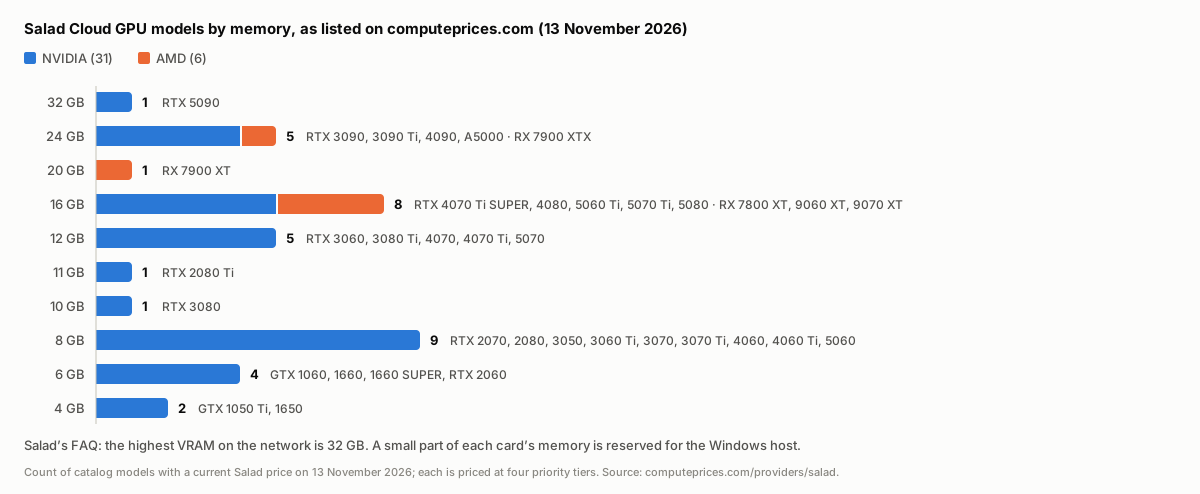 Bar chart of the 37 GPU models computeprices.com lists for Salad Cloud on 13 November 2026, grouped by memory: 1 model with 32 GB (RTX 5090), 5 with 24 GB, 1 with 20 GB, 8 with 16 GB, 5 with 12 GB, 1 with 11 GB, 1 with 10 GB, 9 with 8 GB, 4 with 6 GB and 2 with 4 GB. 31 are NVIDIA and 6 are AMD.
On 13 November 2026 the Salad page listed 37 GPU models. Two things follow from the chart:
- Memory sets the ceiling. A model whose weights and working memory do not fit in 32 GB, less what Windows reserves, cannot run on one Salad GPU. Data-center cards such as the H100, H200 or B200 are not in the on-demand catalog; for those, see the H100 page and the other providers that carry them.
- Most of the catalog is 16 GB or less. Salad's docs advise starting from VRAM and then selecting every class that fits, because each instance can run on any class you selected and more classes means more nodes to allocate from. They also note that an image built for CUDA runs only on NVIDIA cards and one built for ROCm only on AMD cards, so a container group stays with one vendor.
If you are sizing a 24 GB workload, the 24 GB category page lines up every 24 GB card across providers, including the RTX 3090 and RTX 4090 that Salad lists. The RTX 5090 page covers the one 32 GB class.
SaladCloud priority tiers
Every GPU class is priced at four priority levels: High, Medium, Low and Lowest (the API calls Lowest "batch"). Salad's docs put the trade plainly: "Lower priority levels have reduced costs. Higher priority container groups can preempt lower priority ones if a higher-paying job becomes available."
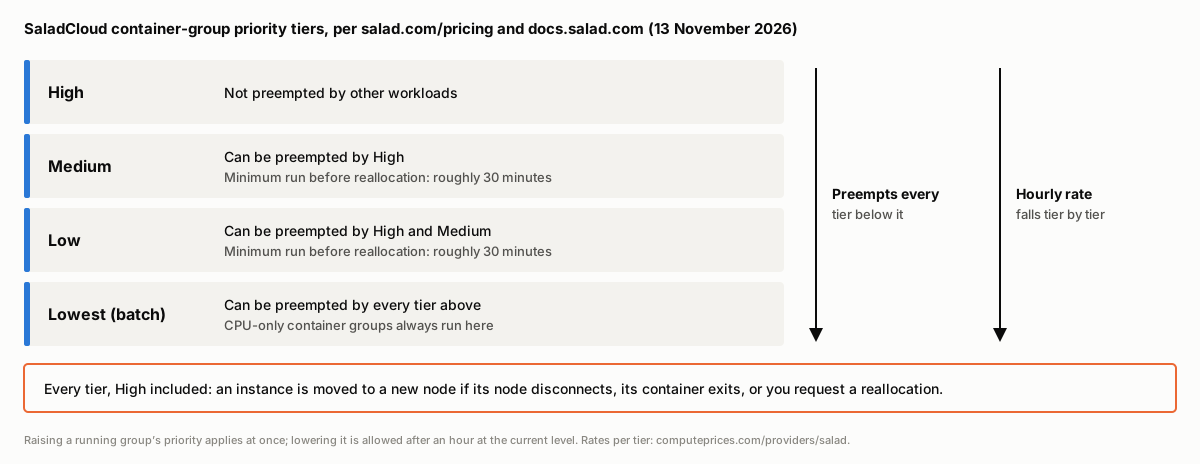 Diagram of SaladCloud's four priority tiers from High to Lowest. Each tier can preempt every tier below it, and the hourly rate falls from High to Lowest. High is never preempted by other workloads; Medium and Low can be preempted by higher tiers; Lowest can be preempted by all three and is where CPU-only container groups run. Every tier, High included, is still reallocated when its node goes offline.
What each tier buys:
- High is never interrupted by other workloads. It is still reallocated if your container exits, if you ask for a reallocation, or if the node disconnects, so High is not the same thing as an uninterruptible machine.
- Medium and Low can be preempted by groups at a higher tier. Salad's pricing page gives these a minimum run of roughly 30 minutes before reallocation.
- Lowest is the most interruptible and is the tier Salad points to for retryable batch work and stateless inference behind a queue. Container groups with no GPU always run here and can be interrupted by any container group that requests a GPU.
You can change a running group's priority. Raising it applies at once, rates included. Lowering it is only allowed after the group has run at its current level for an hour; to lower it sooner, stop the group, change the priority and start it again. Salad's advice is to "pick the lowest priority level that meets your interruption tolerance" and raise it if interruptions are too frequent.
How SaladCloud billing works
Salad bills container instances per second while they are in the running state. The meter does not run while an instance is allocating or downloading its image, which matters on a network where image downloads are slow: as Salad's docs put it, a slow download "costs time, not money".
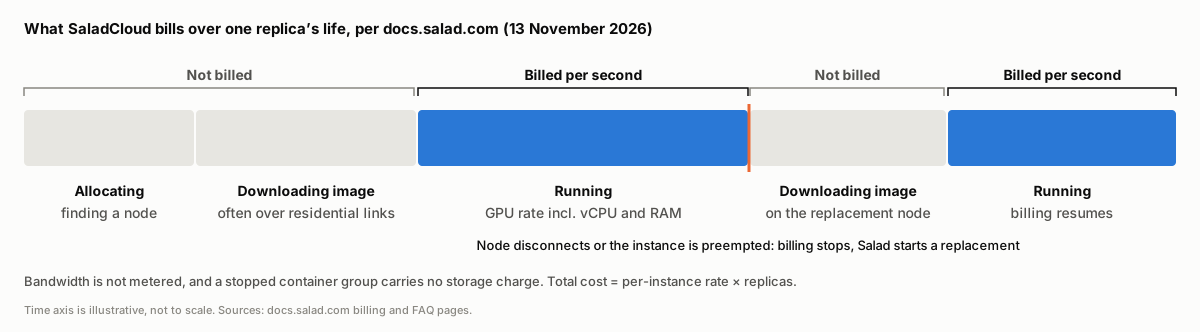 Timeline of one SaladCloud container instance: allocating and downloading the image are not billed; running is billed per second at the GPU class and priority rate, which includes vCPU and RAM; billing stops when the instance stops, is preempted or its node disconnects, and the replacement instance on a new node again downloads the image unbilled before it runs.
The rest of the bill is short:
- vCPU and RAM are included in the GPU class rate. Salad's billing docs: "For GPU container groups, there are no additional charges for RAM and vCPU." CPU-only container groups are billed per vCPU-hour plus per GB of RAM per hour.
- Bandwidth is not metered, and stopped container groups carry no storage charge, according to Salad's FAQ.
- The total is the per-instance rate times replicas. Because the docs recommend running more than one replica for redundancy, the replica count you need for your uptime target is part of the price.
- Payment is prepaid. Credits are bought by card (manually or with auto recharge) or with USDC, USDT or RENDER on Solana. Credits expire 12 months after purchase, and usage is shut down when the balance runs out. There is no minimum commitment and no free trial.
- Volume discounts are offered on large prepaid credit purchases, on request to Salad's sales team before you buy; deployments above 100 GPUs and committed contracts are also priced by sales below list.
How computeprices.com stores Salad's rates
We read Salad's GPU-class API once a day (our methodology explains how every price is collected and dated). Each row is one GPU, priced on demand, with the priority tier stored as the row's variant, so every GPU class appears four times on the Salad page: "High Priority", "Medium Priority", "Low Priority" and "Lowest Priority". Where Salad sells several classes that map to one catalog card (the RTX 3060 comes in two memory sizes), we store the cheaper class for each tier.
When comparing Salad against another provider, line up tiers deliberately. A Lowest Priority row is a preemptible rate, closer in kind to a spot instance elsewhere than to an on-demand one, even though our tables list every Salad tier as on-demand.
What Salad Cloud suits, and what it does not
Salad's docs and FAQ are direct about the fit:
- Fits: inference that scales across independent replicas (image generation, speech, smaller language models), batch jobs that pull work from a queue and can retry an item, and workloads whose model fits in consumer-card memory. Salad's FAQ cites a production image-generation customer that requested 100 nodes and had at least 82 running at every point over a day.
- Does not fit: workloads with tight latency requirements (Salad's FAQ: "Workloads requiring extremely low latency times are not a fit for our network"), anything that needs persistent local disk, models larger than 32 GB per GPU, and regulated data: Salad says it cannot guarantee compliance with requirements such as HIPAA.
- Training is possible on interruptible capacity if the job checkpoints to external storage often (Salad documents an LLM fine-tuning pattern for this), but tightly coupled multi-node training needs the interconnect a data-center cloud provides.
Salad compared with GPU marketplaces
Salad is often grouped with host marketplaces such as Vast.ai and Runpod's Community Cloud, and its supply looks similar: consumer GPUs owned by third parties. The buying model is different. On a host marketplace you choose a machine and its host sets the price; on Salad you choose GPU classes and a tier, and Salad sets one published rate per class and tier and decides which nodes run your containers. Our GPU marketplaces comparison covers how that changes reliability, pricing and the meaning of "cheapest" across the marketplaces we track.
For side-by-side tables on the cards two providers share, see Salad vs Vast.ai and Runpod vs Salad. Salad alternatives ranks every provider that sells the same GPUs, and the full GPU table filters by card and pricing type.
Frequently asked questions
What is SaladCloud? A container cloud that runs workloads on privately owned consumer PCs while their owners are not using them. You deploy a container image as a container group with a GPU class, a priority tier and a replica count, and Salad schedules the replicas onto nodes and replaces them when nodes leave.
How does Salad GPU pricing work? Each GPU class has a published hourly rate at each of four priority tiers, billed per second while an instance is running. vCPU and RAM are included, allocation and image download are not billed, and bandwidth is not metered. The Salad page shows the current rate for every class and tier.
Which GPUs does Salad Cloud have? Consumer and workstation cards: NVIDIA GeForce from the GTX 10 series to the RTX 50 series, an RTX A5000, and AMD Radeon RX 7000 and 9000 cards. The largest is the 32 GB RTX 5090. Data-center GPUs are only available as contracted Salad Dedicated hardware.
Is Salad AI capacity reliable enough for production? Salad's FAQ puts individual node reliability at 90 to 95 percent and recommends multiple replicas, client retries and a queue for long work. Stateless inference built that way runs in production on Salad; single-instance services and low-latency workloads are a poor fit.
Can Salad Cloud instances be interrupted at High priority? Not by other workloads. A High priority instance is still moved to a new node if its node disconnects, if the container exits or if you request a reallocation.