
H200 GPU Rental: What Sets the Price and Where to Compare It
The same NVIDIA H200 is listed at very different hourly rates across clouds. Here is what causes the spread, and how to compare like with like.
- GPUs
- NVIDIA
- Pricing
- Cloud Computing

H200 GPU Rental: What Sets the Price and Where to Compare It
Anyone searching for an H200 GPU price finds out quickly that there is no single number. The same NVIDIA H200 is listed by dozens of providers, and the hourly rates for it differ by a wide margin. This guide explains what the H200 changes against the H100, which differences between listings are real and which are artifacts of how a rate is quoted, and how to read the live H200 table so you compare like with like. We do not print rates here, because they change daily; the table shows each provider's current figure and the date it was read.
What the H200 changes against the H100
The H200 uses the same Hopper compute die as the H100. What changed is memory: 141 GB of HBM3e at 4.8 TB/s, against 80 GB of HBM3 at 3.35 TB/s on the H100 SXM. Tensor throughput is essentially the same.
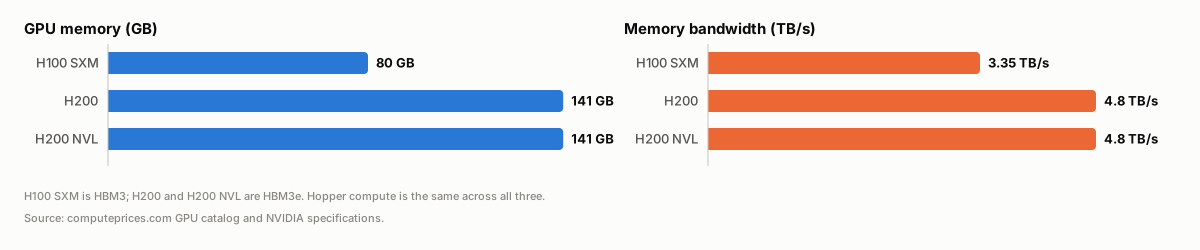 Bar charts comparing memory capacity and memory bandwidth of the H100 SXM, H200 and H200 NVL
That matters for pricing in one way: you are paying for memory capacity and bandwidth, not for extra compute. A workload that already fits in 80 GB and is compute-bound gains little from the H200. A workload limited by model size, KV cache or batch size can fit on one H200 where it needed two H100s. For the full spec and model-sizing comparison, including Blackwell, see H200 vs B200 vs GB300.
Why one H200 has many rates
A listed rate is never "the H200 price". It is the price of one specific offering, and an offering is defined by more than the GPU. On computeprices.com each stored rate is a named seller's real offer for one combination of the following, and rows that differ on any of them are kept apart:
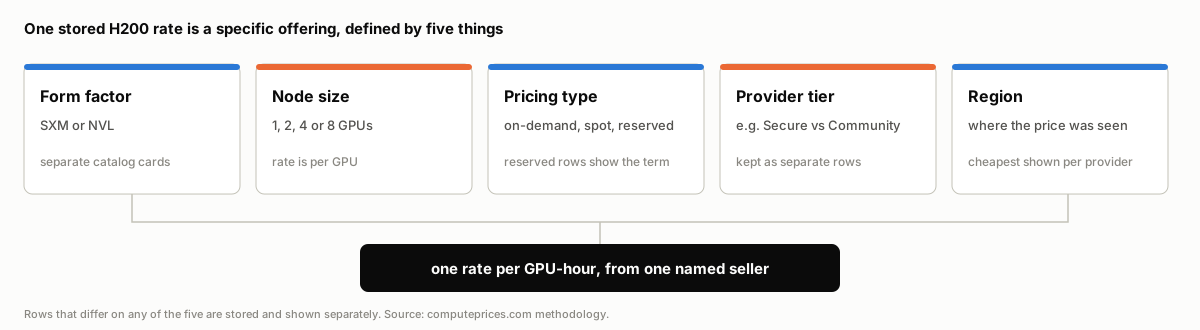 Diagram of the five things that define one H200 rate: form factor, node size, pricing type and term, provider tier, and region
SXM and NVL are different cards
"H200" on a provider's page can mean the SXM module on an HGX board or the PCIe-style H200 NVL. Both carry 141 GB of HBM3e, but the NVL is an air-cooled card with a lower power limit that links GPUs through 2- or 4-way NVLink bridges rather than the SXM board's NVLink switch. That changes how well it scales across several GPUs, so we list them as separate catalog cards. A bare "H200" with no other qualifier is treated as the SXM card. Comparing an NVL rate with an SXM rate is the first way to compare unlike things.
Node size
Rates on the site are per GPU, never the instance total. A provider that sells only 8-GPU nodes still appears with a per-GPU figure and its GPU count next to it. Some providers charge differently for 1, 2, 4 and 8 GPUs of the same card, so a single provider can have several rows. If you only need one GPU, filter to a node size you can actually rent.
Pricing type and commitment
On-demand is the rate with no commitment. Reserved rates are lower per hour in exchange for a term, and the table shows the term in months next to the rate. Spot rates, where a provider offers them, can be interrupted. The GPU comparison table has a pricing-type filter; compare on-demand with on-demand, and reserved only against reserved of a similar term. Mixing them produces a misleading "cheapest".
Provider tier
Some providers sell the same GPU in two tiers at once. Runpod, for example, lists a Secure Cloud and a Community Cloud rate for the same card; we store the tier as part of the offering instead of merging them. The same applies to a hyperscaler's region: an AWS H200 in one region and another are separate rows, and the main table shows the cheapest region per provider.
Marketplaces and named sellers
Marketplaces such as Vast.ai, Lium and GPU Outlet list many hosts. When the source does not name the host, we store the cheapest listing as that marketplace's rate, so it is a real offer but also a floor. A marketplace floor is not comparable with a managed cloud that guarantees capacity, support and a network. Our marketplace comparison covers the trade-offs, and the methodology explains the rule in full.
How many providers rent the H200
The H200 is no longer scarce. As of 4 November 2026 the H200 page lists 49 providers, compared with 62 for the H100 SXM and 6 for the H200 NVL.
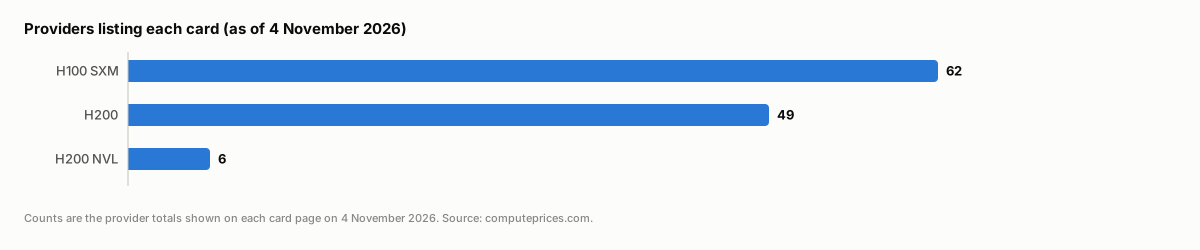 Bar chart of providers listing each card as of 4 November 2026: H100 SXM 62, H200 49, H200 NVL 6
The list spans hyperscalers (AWS, Azure, Google Cloud, Oracle), GPU-focused clouds (CoreWeave, Nebius, Crusoe, Together AI), and marketplaces. Wide supply is why the spread is wide: the cheapest and the most expensive listing for the same card routinely differ several-fold, and most of that gap is explained by the factors above rather than by one provider being unreasonable. To see how two providers line up directly, use a side-by-side page such as AWS vs CoreWeave or Runpod vs Vast.ai.
How to read the live table
- Pick the card first. Open H200 (SXM) or H200 NVL, not a page that mixes them.
- Match the pricing type and term. Compare on-demand against on-demand. Treat a reserved row as a commitment, not an hourly price you can walk away from.
- Match node size. The GPU count is shown for each row. Per-GPU rates at 8 GPUs are not an offer for a single GPU.
- Check the date. Each row shows when it was last updated. An older row means the provider's source has not changed or was not collected since.
- Open the source. Every row links to the provider so you can confirm the rate and the terms (egress, storage, minimum billing time) before you commit. Costs beyond the GPU are the other half of the bill.
Checking the alternatives
If the H200's memory is more than you need, the H100 is widely available and usually cheaper per hour. If you are memory-limited even at 141 GB, Blackwell parts such as the B200 offer more memory and bandwidth per GPU, with thinner supply. The right comparison is cost per unit of work for your job, not cost per GPU-hour.
Frequently asked questions
How much does an H200 cost to rent? It depends on the provider, node size, pricing type and term, so there is no single figure. The live H200 table shows each provider's current per-GPU hourly rate and when it was read.
Why is the H200 listed at such different rates? Listings differ in form factor (SXM or NVL), node size, on-demand or reserved term, provider tier and region, and a marketplace floor is a different product from a managed cloud. Compare rows that match on all of these.
Is the H200 NVL the same as the H200? They have the same 141 GB of HBM3e at 4.8 TB/s. The NVL is a PCIe-style air-cooled card with NVLink bridges and a lower power limit; the H200 SXM sits on an HGX board with an NVLink switch. They are separate cards on the site because they scale differently across GPUs.
Is the H200 worth it over the H100? For memory-bound work such as LLM inference with long contexts, usually. For compute-bound training that fits in 80 GB, the two perform similarly, so the decision depends on the current price gap.
Where does the data come from? Rates are collected from each provider's own pricing page or API, normalized to per-GPU per-hour USD, and validated before they are shown. The methodology describes the process.