
CoreWeave Pricing Explained: How the Bill Is Built and How to Compare It
CoreWeave lists rates per instance, not per GPU. Here is how that bill is composed, what is billed separately, and how to compare it with other clouds.
- Pricing
- CoreWeave
- Cloud Computing
- GPUs

CoreWeave Pricing Explained: How the Bill Is Built and How to Compare It
CoreWeave pricing is easy to look up and easy to misread. CoreWeave's pricing page lists a rate for each instance configuration, with the number of GPUs in that configuration beside it, so the figure you see is not a per-GPU rate. This guide explains how a CoreWeave bill is composed, what is billed on top of the GPU, and how to compare it with other providers. We print no rates here because they change; the live CoreWeave page shows the current figures and the date each was read. Everything below about CoreWeave's terms comes from coreweave.com/pricing and docs.coreweave.com as read on 6 November 2026.
Per-instance rates, not per-GPU rates
CoreWeave prices compute per hour for an instance configuration. Most GPU configurations are 8-GPU nodes (HGX H100, HGX H200, HGX B200, HGX B300, A100, RTX PRO 6000, L40 and L40S). The GB200 and GB300 NVL72 instances have 4 GPUs each, across two Grace Blackwell Superchips, and the GH200 instance has one GPU.
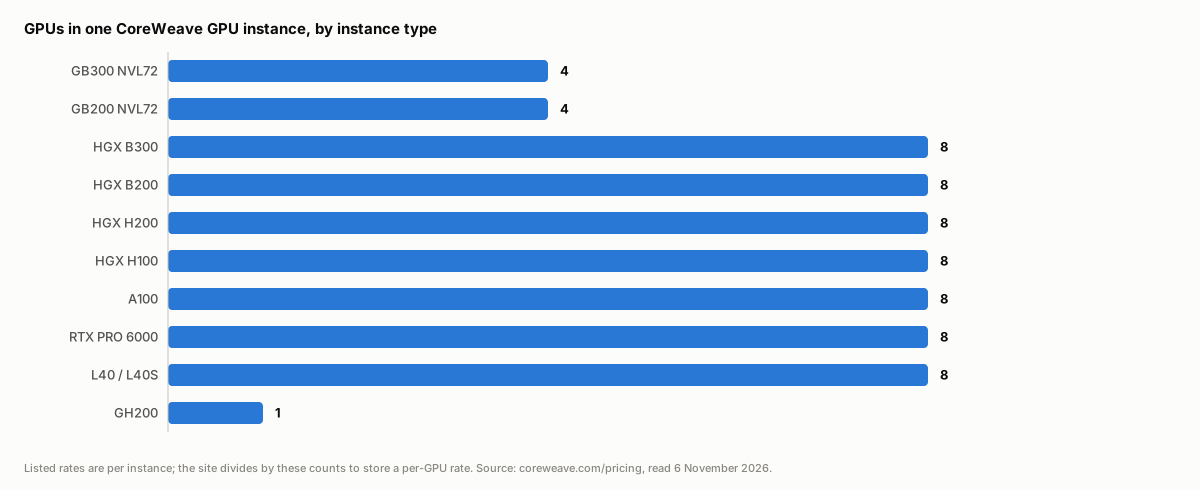 Bar chart of the number of GPUs in one CoreWeave instance by type: GB300 NVL72 and GB200 NVL72 have 4, the HGX, A100, RTX PRO 6000 and L40 types have 8, and GH200 has 1
To compare CoreWeave with a provider that sells single GPUs, divide the instance rate by the GPU count. That is what computeprices.com stores: a per-GPU hourly rate with the GPU count kept beside it, never the instance total. The conversion matters most when you are comparing an 8-GPU CoreWeave node against a one-GPU rental elsewhere, because you are comparing different units of purchase as well as different prices. If you only need one or two GPUs, an 8-GPU node is not an offer you can use.
What is billed on top of the GPU
CoreWeave's page separates the compute rate from other charges:
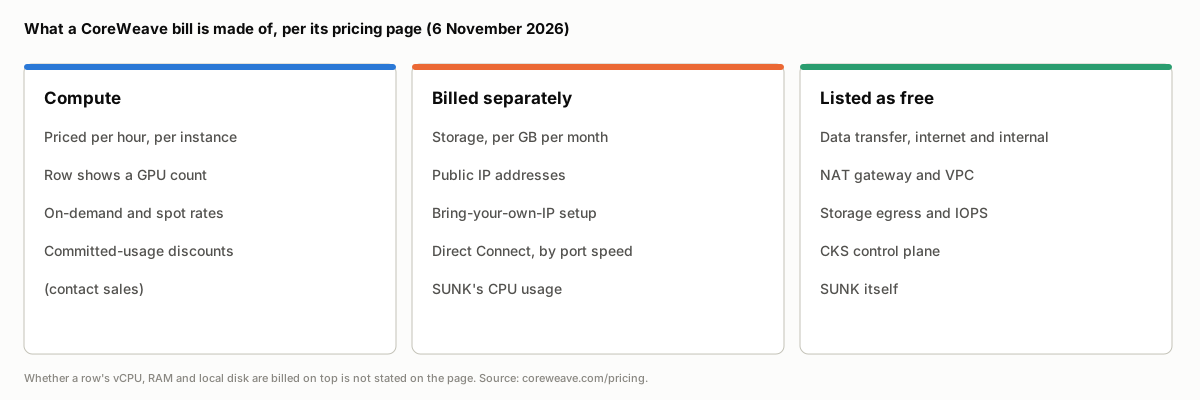 Three columns showing what CoreWeave's pricing page lists as compute, billed separately, and free
- Storage is billed per GB per month, in tiers (hot, warm, cold, archive on AI Object Storage, plus distributed file storage).
- Public IP addresses are billed monthly per IP, and bringing your own IP carries a one-time setup fee.
- Direct Connect private links are billed monthly by port speed.
- SUNK (Slurm on Kubernetes) has no charge of its own, but the CPU resources needed to run it are billed.
- Data transfer between CoreWeave and the internet, and within CoreWeave, is listed as free, as are the VPC, NAT gateway and the CoreWeave Kubernetes Service control plane.
The pricing page does not say whether the vCPUs, system RAM and local disk in a GPU instance are charged separately from the instance rate; they are shown as instance specifications. Confirm that with CoreWeave before you budget. A per-GPU figure on any comparison site, ours included, covers the GPU instance rate only and excludes storage, networking and any quote you negotiate.
On-demand, spot and committed usage
Each GPU type on the page has an on-demand rate and, for many, a spot rate. CoreWeave's documentation describes Spot Node Pools as "preemptible, pay-as-you-go compute with no long-term commitments", so spot capacity can be reclaimed and fits interruptible work; see CoreWeave's Spot Terms of Service for the conditions, and note that its capacity finder does not guarantee a spot node can be provisioned. Some configurations, including GB300 NVL72 and HGX B300, show "contact sales" instead of a rate.
CoreWeave states that it discounts committed usage against on-demand rates, but the page gives no table for it and the terms are agreed with sales. For that reason a committed rate does not appear in the comparison table, and an on-demand row compared against a negotiated reserved quote is not a like-for-like comparison. There is also a separate inference single-GPU rate, which the page says applies only to customers of CoreWeave's inference platform. The Dedicated Inference billing docs describe two models: GPU-hour billing by instance type for on-demand use, and node-based billing for customers with reserved node capacity.
Regions
CoreWeave lists its footprint as North America and Europe, and rates are split by region on the pricing page. A rate is only comparable with another provider's rate in a similar region and at the same pricing type. Our methodology explains how regional rows are stored and which one the main table shows.
Which GPUs to look at
- H100 and H200 are the Hopper options; the H200 adds memory (141 GB against 80 GB) on the same compute die. For the H200 specifically, see what sets the H200 rental price.
- B200 is the Blackwell HGX option. The GB200 and GB300 are rack-scale parts with a different node shape; H200 vs B200 vs GB300 covers the differences.
Each page lists every provider that rents the card, so you can see where CoreWeave sits and what the node size is for each row.
How CoreWeave compares with other clouds
CoreWeave is a GPU-focused cloud with Kubernetes-native tooling and InfiniBand networking, so it is usually compared with other GPU clouds and the large clouds rather than with marketplaces. Marketplaces store a cheapest-host floor, which is a different product from a managed cluster with an interconnect. Use the side-by-side pages to line up two providers on the cards they share: CoreWeave vs Lambda, AWS vs CoreWeave and CoreWeave vs Nebius. The full GPU table lets you filter by card and pricing type.
A checklist for reading a CoreWeave quote
- Find the GPU count for the row and divide the instance rate by it.
- Match the pricing type. On-demand against on-demand, spot against spot.
- Match the region to where your data and users are.
- Add the extras you will use: storage, public IPs, Direct Connect, and the CPU cost of SUNK if you run it.
- Check the date on the live row and confirm terms on CoreWeave's own page before committing.
Frequently asked questions
How much does CoreWeave cost per hour? It depends on the instance type, region and pricing type, and CoreWeave lists rates per instance rather than per GPU. The CoreWeave page shows the current per-GPU figures and when they were read.
Is CoreWeave priced per GPU or per instance? Per instance configuration, with a GPU count on each row. Divide by the count to get a per-GPU rate.
Does CoreWeave charge for data transfer? Its pricing page lists data transfer between CoreWeave and the internet, and within CoreWeave, as free. Storage, public IPs and Direct Connect are billed.
Does CoreWeave offer spot or reserved pricing? The page lists on-demand and spot rates. Committed-usage discounts are offered through sales and are not published as a table.
Does computeprices.com show CoreWeave's negotiated or committed rates? No. The site collects public on-demand and spot rates, so negotiated pricing and minimum commitments are not reflected.